


Torus Updates
See what’s new, what’s coming, and how we’re building the future of open learning
Latest Releases
For urgent fixes, visit our Hot Fix Status page.
Release Schedule
| Code Freeze Date | Release Date | |
|---|---|---|
| Torus v.0.32.0 (Design Demo) | November 10, 2025 | December 9, 2025 |
| Torus v.0.32b | February 2, 2026 | February 23, 2026 |
| Torus v.0.33.0 (Design Demo) | May 11, 2026 | May 27, 2026 |
| Torus v.0.34.0 (Design Demo) | July 20, 2026 | August 6, 2026 |
| Torus v.0.35.0 | October 26, 2026* | TBD |
| Torus v.0.36.0 | March 1, 2027* | TBD |
*Tentative dates

Tap the image to get the current roadmap (as of Dec 1st)
Product Strategy
2026: Strengthening the Learning Foundation
In 2026, Torus is focused on improving the core teaching and learning experience. Our roadmap emphasizes helping educators better align course content with learning objectives, providing more meaningful insights into learner progress, and giving instructors greater flexibility to adapt courses to their teaching needs.
Key initiatives include enhancements to learning objectives and learning proficiency, improved analytics for students and instructors, assessment customization, and usability improvements across the platform. Together, these investments strengthen Torus’ ability to support evidence-based teaching, make learning progress more transparent, and help educators make informed decisions that improve learner outcomes.
2027: Building an Intelligent Learning Ecosystem
Our vision for 2027 is a more personalized, intelligent, and scalable Torus. Through AI-assisted authoring, adaptive instructor tools, intelligent learner guidance, and streamlined platform experiences, we aim to make creating, teaching, and learning with Torus more effective than ever before.
Building on the foundations established in 2026, the 2027 roadmap expands Torus into a more intelligent and adaptable platform that serves learners, instructors, authors, and administrators more effectively.
The roadmap focuses on four strategic themes:
- Personalized Learning and Teaching
- Simplified Course Creation and Authoring
- Platform Growth and Scalability
- Continuous Improvement Through Insight
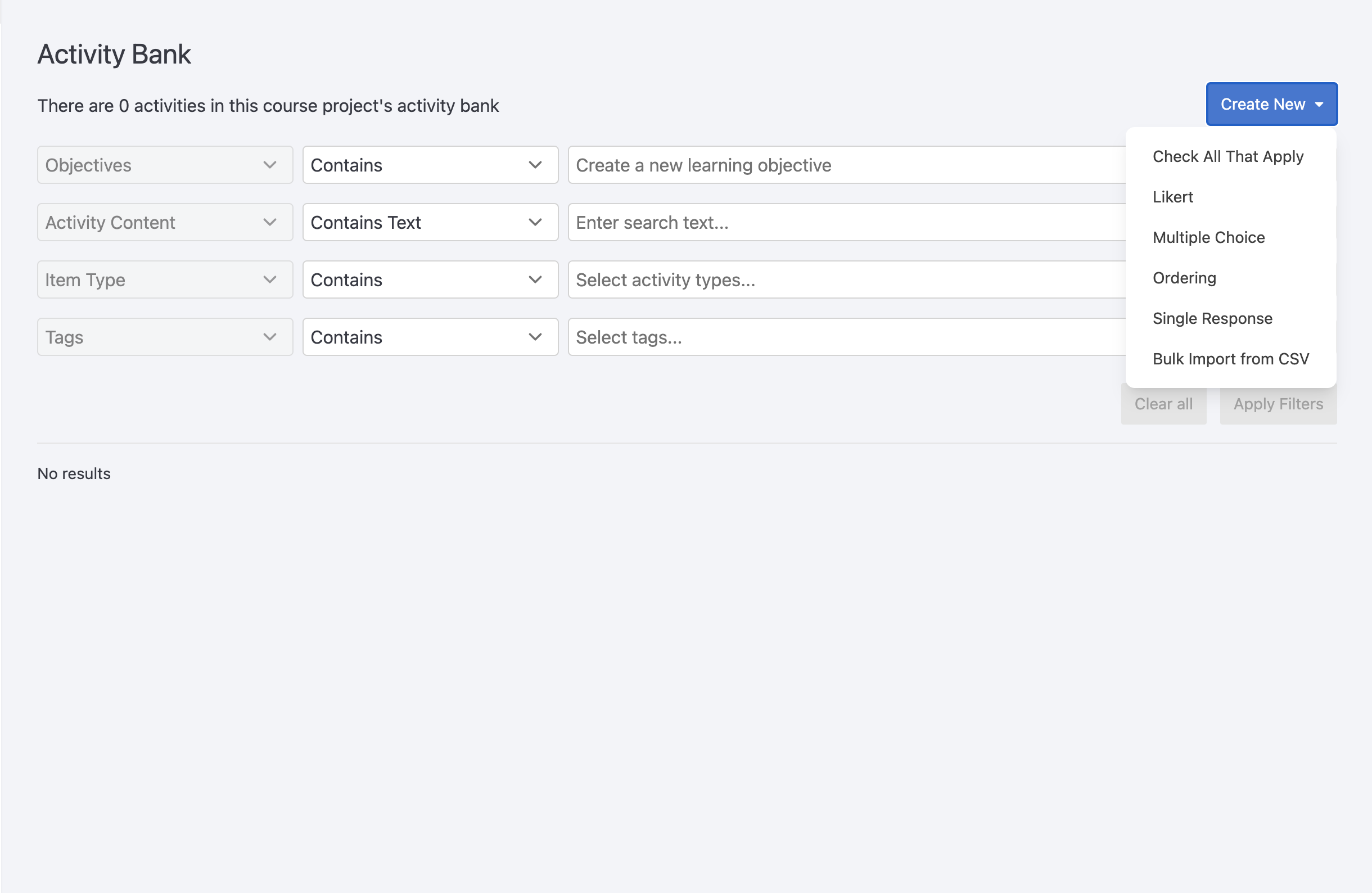 The Activity Bank lets you create and manage a library of reusable activities—like quiz questions—that can be pulled into different course pages. Activities are searchable, taggable, and aligned with learning objectives, making it easy to find what you need.
When building a course, you can select a subset of activities from the bank using filters or rules (e.g., random selection, tag-based criteria). This makes it easier to add variety, discourage memorization, and support student engagement.
Why use it?
-
Reuse questions across multiple pages without duplicating content
-
Randomly select questions to reduce memorization or cheating
-
Let students skip questions they don’t connect with
-
Centralize activity updates in one place
Related Links
- Watch the demo (starts at 36:55)
Documentation coming soon.
Related Link
- …
AI Activation Points let authors trigger the DOT AI assistant at specific places in a course—such as activities, paragraphs, groups, or full pages. When a student reaches an Activation Point, DOT AI responds based on the custom prompt provided by the author.
⚠️ Requires DOT AI to be enabled in the course section by a system administrator.
Why use it?
-
Add context-aware AI responses tied to course content
-
Trigger interactions based on student actions or page visits
-
Use custom prompts to guide DOT AI’s response
Related Links
Using Branched Questions in Torus
What are branched questions?
Branched questions allow you to create adaptive pathways within a multiple choice activity. Based on a student’s response to the questions within the activity, you can route them to a specific follow-up question. This enables you to:
- Personalize learning paths
- Diagnose misconceptions
- Provide targeted practice or remediation
- Reduce unnecessary questions for students who demonstrate understanding early
In many cases, this means that not all students will see or answer every question in the activity.
How scoring works (important)
By default, Torus calculates scores based on the total number of activities available on the page, not just the questions a student encounters through branching.
This can create a mismatch where:
- A student completes their intended path
- But does not receive full credit or a completion checkmark (✔)
- Because they did not answer all possible questions
Recommended approach: Adjust completion criteria
To ensure students are evaluated fairly based on the questions they encounter and actually complete, you can adjust the page’s completion settings.
Step 1: Estimate the expected path length
Determine the minimum number of questions a student will answer when completing a valid branch.
Step 2: Set the completion percentage
In the page options in Torus authoring:
- Adjust the completion percentage (Full Progress %) to reflect that minimum expected path
- This allows students who complete a valid branch to meet the completion requirement
Important considerations
Because completion settings apply to the entire page, you’ll need to account for all activities on that page.
Be mindful that:
- The completion threshold should not be achievable without engaging with the branched questions
- The threshold should also not be achievable by completing only part of the branching activity while skipping other required components
Best practices
To get the most accurate and predictable behavior:
- Keep branched question sets on their own page whenever possible
- This simplifies completion logic and avoids conflicts with other activities
- Design branches with similar lengths
- Reduces variability in how many questions students answer
- Test your branching paths
- Walk through different answer combinations to confirm students can reach completion as expected
If you need more precise scoring control across complex activities, consider structuring content across multiple pages to better align scoring and completion behavior with your instructional intent.
Related Link
 Certificates in Torus let authors set achievement requirements for a course, such as minimum scores or discussion activity. When students meet the conditions, they’re awarded a certificate—either automatically or after instructor approval. Authors can customize the certificate’s design, thresholds, and delivery settings.
⚠️ Certificate requirements must be finalized before creating a course section. They cannot be edited afterward.
Why use it?
-
Recognize student achievement through a formal certificate
-
Customize design and thresholds for completion or distinction
-
Track and manage certificates in the instructor dashboard
Related Links