


Torus Version 31 introduces a collection of focused enhancements that improve usability, control, and transparency for instructors and authors. This release puts flexibility and efficiency front and center, empowering users with a redesigned scheduling experience, more immediate feedback for learners, and refined data exports for better tracking and analysis.
Whether you’re setting course deadlines, configuring assessments, reviewing student progress, or integrating interactive activities, v.31 makes these workflows smoother and more powerful than ever.
Score-as-You-Go for Basic Page
In Version 31, authors can now enable Score-as-You-Go behavior for basic pages, allowing students to receive immediate feedback as they work through each question, rather than waiting until the end of the assessment. This feature offers a more interactive learning experience, promoting real-time reflection and iterative understanding.
By receiving feedback question-by-question, students are better equipped to learn from their mistakes in the moment. This also helps instructors and authors design learning paths that emphasize growth and progression, rather than relying solely on end-of-quiz results.
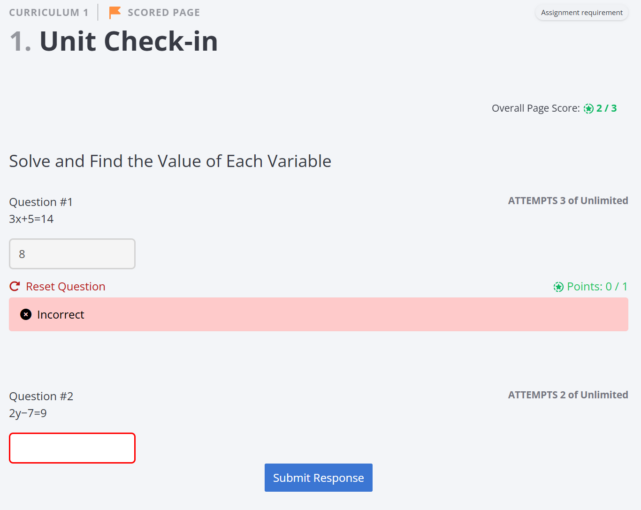
Activities on a score-as-you-go page
Redesigned Scheduling and Assessment Settings
One of the most impactful changes in v.31 is the introduction of a redesigned scheduling experience, giving instructors centralized control over timelines, content access, and assessment policies. All scheduling-related tools now live in one place: the Manage tab → Curriculum → Scheduling and Assessment Settings. From here, instructors can manage course flow across four streamlined tabs: Schedule, Assessment Settings, Student Exceptions, and Advanced Gating.
Within the Schedule tab, instructors will now find Agenda visibility settings, a convenient search bar, and a redesigned Set Schedule modal. These updates make it easier to locate content, set due dates, and manage visibility with less friction, especially in larger courses.
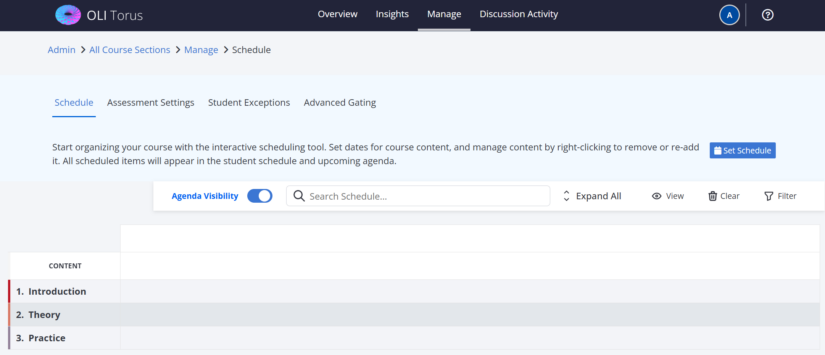
Course schedule before applying schedule preferences
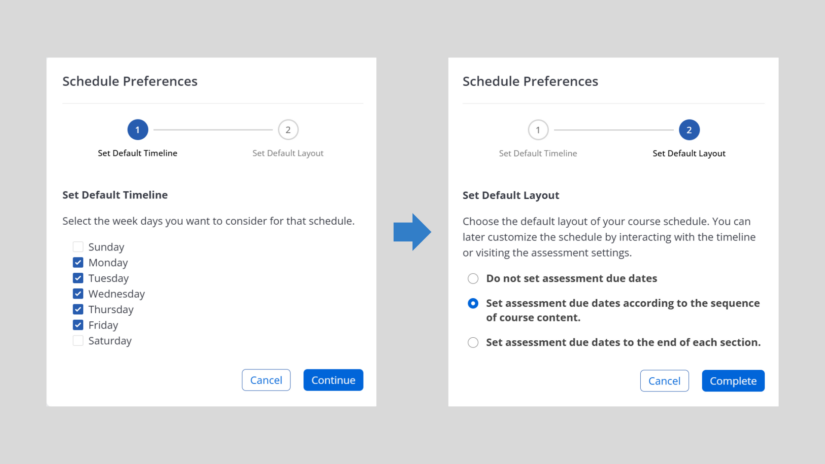
Schedule Preferences available for course sections
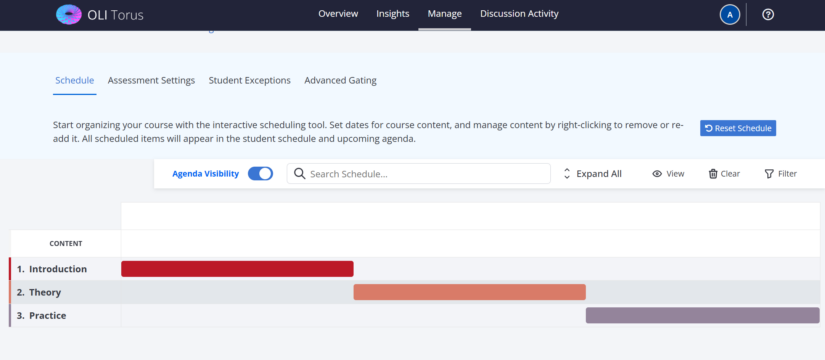
Course schedule after applying schedule preferences
Another major improvement is the Advanced Gating interface, now integrated directly into the tab panel. Advanced Gating gives instructors fine-grained control over what students can access, and when. Instructors can now easily apply conditions based on assessment completion, minimum scores, or date-based logic. Whether you’re building custom release pathways or managing complex pacing, this powerful tool is now much easier to find and use.
LTI Tool Integration in Basic Pages
Torus v.31 introduces expanded support for third-party tools through LTI tool integration in basic pages. Instructors can now embed LTI tools directly within their course content. This update brings more interactive and customizable learning experiences into the Torus environment.
These tools offer instructors the flexibility to select specific resources from the external platform, tailor the learning activity to their goals, and in many cases, support grade passback into Torus. This means students can engage with rich media content and learning activities without leaving the platform, while instructors maintain visibility and control over engagement and grading.

LTI activity embedded on course page as visible for instructor accounts.
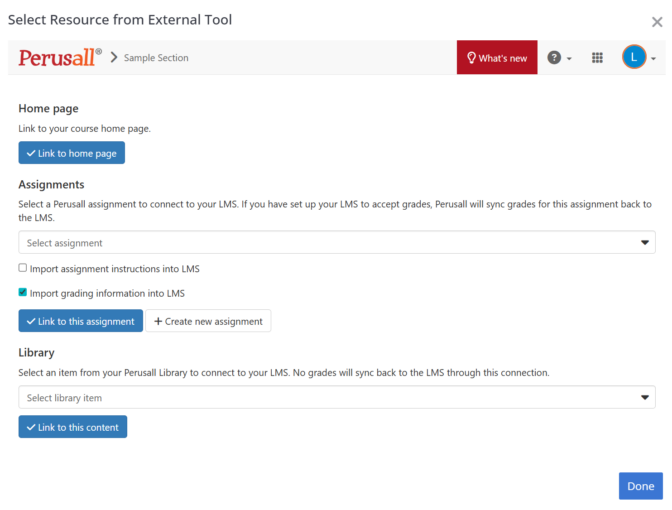
Assignment selection window as visible for the Perusall LTI integration and available on the course page for instructors.
Instructor CSV Download Improvements
Version 31 also includes thoughtful refinements to instructor-facing CSV downloads. These improvements focus on clarity, consistency, and usability. Fields across downloadable reports have been standardized, making it easier to understand and use data across reports. Cluttered or redundant fields have been removed, and helpful new fields have been added to support more granular analysis.
Whether you’re reviewing assessment performance, tracking participation, or preparing reports for your department, these cleaner CSVs will help you spend less time reformatting and more time acting on insights.
Bug Fixes and Backend Enhancements
Torus v.31 also includes a variety of performance improvements and bug fixes across the platform. These updates address both visual and functional issues surfaced through internal testing and community feedback, helping ensure a more stable and seamless user experience. For more technical details on what has been fixed or improved behind the scenes, we encourage you to review the full release notes.
Looking Ahead
With a focus on immediacy, control, and usability, Version 31 reflects Torus’s ongoing commitment to evolving alongside the educators and learners it serves. From faster feedback to smarter scheduling, these updates are designed to support more responsive teaching and more engaged learning.
Explore the full release notes and the v.31 demo recording to dive deeper into everything that’s new.
And as always, stay tuned for Torus v.32, where we’ll continue building a more intelligent, supportive, and scalable platform for the future of learning.
Latest News

Torus Version 32b: Accessibility, Mobile Refinements, and High-Impact Fixes
Torus Version 32b is a focused addendum to Version 32, delivering meaningful improvements in accessibility, mobile responsiveness, admin workflows, and instructor analytics. This release also resolves several high-impact issues affecting proficiency filtering, course copying, and activity bank metadata. While compact in scope, 32b strengthens usability, reliability, and inclusivity across the platform.

Torus V.32 Accelerates Admin Workflows and More Actionable Instructor Analytics
Adds Score-as-You-Go feedback, redesigned scheduling, LTI integration, and cleaner data exports for smoother teaching workflows.
Design Demo ·
Demo Video ·
Release Notes (coming soon)
New dates added: Come see Torus!
Explore the next generation of OLI’s learning platform—Torus. Join our June 26 webinar to see the modern new UI, discussion boards, LMS gradebook passback, AI assistant tools, collaborative notes, and more.